Ente Photos, a Privacy-first Photo App
Full Disclosure: When I contacted Ente with questions regarding my review I was given a free family account. I have been using it daily since September 2025.

Last month I published an interview with one of my children about Ente Photos, a privacy-focused photo management app. This month, I'd like to describe my own experience with Ente from a parent's perspective.
Ente Photos is a fully open source, privacy-first application for storing and managing photographs and videos. It includes modern AI search features while keeping your personal data private.
One of the things that appeals to me as a parent is that Vishnu Mohandas, Ente's CEO, developed Ente in order to be able to privately manage and share photo's within his own kids. This is one of the reasons I wanted to first let one of my own children try Ente and review the product.
Photographs are not a constant focus for me. I am not on any personal social media, and I usually leave my smartphone at home when I go out. However, I seem to have accumulated a lot of images and videos over the years, and managing those in a general cloud storage application not designed specifically for photo's was less than satisfactory.
I thought I would give Ente Photos a try, and, as it turns out, the app has now settled unobtrusively into my daily workflow. I particularly appreciate that Ente Photos is a tool that has privacy built in by default, yet still feels competitive with mainstream alternatives.
Initial scan and file management
I found the transition to Ente Photos easy. Previously, I had been backing up photo's and videos on my pCloud server, manually naming folders with dates (like 'summer 2023').1
I did the initial, full transfer of all my photo's and videos on my PC. Ente Photos gives you clear indicators of your data, and it told me that I had 23,000 files. I let these upload and be encrypted overnight.
The process worked without a hitch, but my first hurdle was what to do with the hodgepodge network of folders and subfolders that had developed iteratively over the years. I tried to upload the whole folder structure but quickly gave up on that idea and just decided to upload all the individual files into the Uncategorized category in the Ente Photos app. Given the interface is focused on visual organisation, it felt simpler to abandon the old text-based folder system.
Ente Photos automatically organises files by date, and for me, this was a simple solution to my categorisation issue.
It felt refreshing to be able to browse and manage so much visual material on my monitor screen, but it was also overwhelming. I found it quite emotional to literally see your whole life flash before your eyes. I couldn't stop browsing! As the interface puts the latest files on top, you get to see your kids grown younger and smaller as you keep scrolling down, and this was a powerful trip down memory lane.
One tip: if you intend on using the AI scanning tool for easier visual-based searching within your database, Ente recommends turning that on as you upload your photo's for the first time, rather than have machine learning scan the whole database retroactively.
The account settings menus are straightforward, and it was exceptionally easy to bring my kids in under the umbrella of my family Ente account. They just needed to set up their own free Ente accounts and share those usernames with me. And while the total data pool is shared among family members, each individual's set of albums are completely private to them, so there can be no parental spying.
Ente Photos on desktop
I use a Linux desktop PC (MX Linux) and so I had to download Ente's AppImage. This is a self-contained program that you can place anywhere you like. Once downloaded, I had to right-click on the file and under Permissions allow it to work as an executable program.
This is a Linux-specific issue, but the downside of AppImages is that with each update, you have to delete the existing AppImage, download the latest one, change permissions and then click on it to start it up again. This can feel chore, especially if, like me, you have several AppImages to maintain. However, Ente's update schedule has felt sensibly paced so far, unlike, for example, Tuta Mail's frequent AppImage updates. I trust that in Windows and iOS, the Ente Photos app will just update itself automatically.
I haven't been able to get Ente Photos to automatically start when I turn on my PC, so one of the first things I do when rebooting is activate Ente so that it can continue updating my photo's. Maybe there is a way to do this automatically but I haven't figured it out yet.
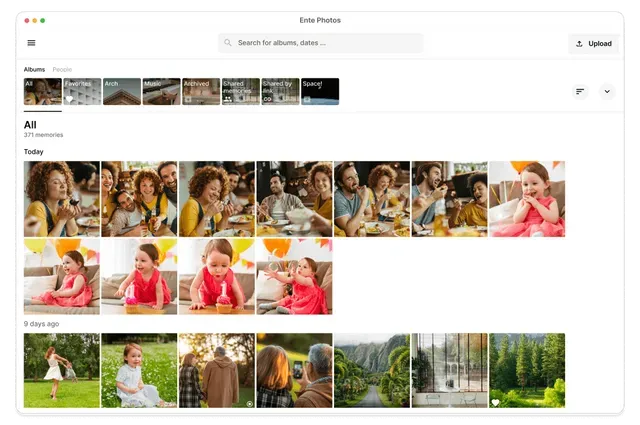
Ente Photos desktop in light mode
Ente Photos looks beautiful and organised on my monitor screen. A strength of single-purpose software like this is that the developers can focus on doing that one thing really well. Whereas with pCloud I was able to backup, sync and manage all kinds of files, including, for example, photo, text and audio files, Ente Photos sticks with its core focus, and that is a real feature.
I would recommend managing accounts, machine learning, deleting duplicates and similar images (great feature!) on your PC, as everything is bigger and therefore easier. I ended up removing 11 GB of data de-duplicating files—very satisfying!
One gripe I have is that sharing photo's doesn't work as well on desktop. I got in touch with the help desk, and they replied:
Yes — currently on the desktop app, the only way to share multiple photo's via a public link is to create an album first and then share that album. The quick link option for arbitrary multi-selection is available on mobile, but it’s not yet supported on desktop.
This is something to keep in mind if you intend to do most of your sharing from a PC.
Ente sends out an informative email newsletter highlighting recent developments and updates. They seem very proactive at the moment, so it wouldn't surprise me if the above issue will be addressed at some point.
Ente Photos on mobile
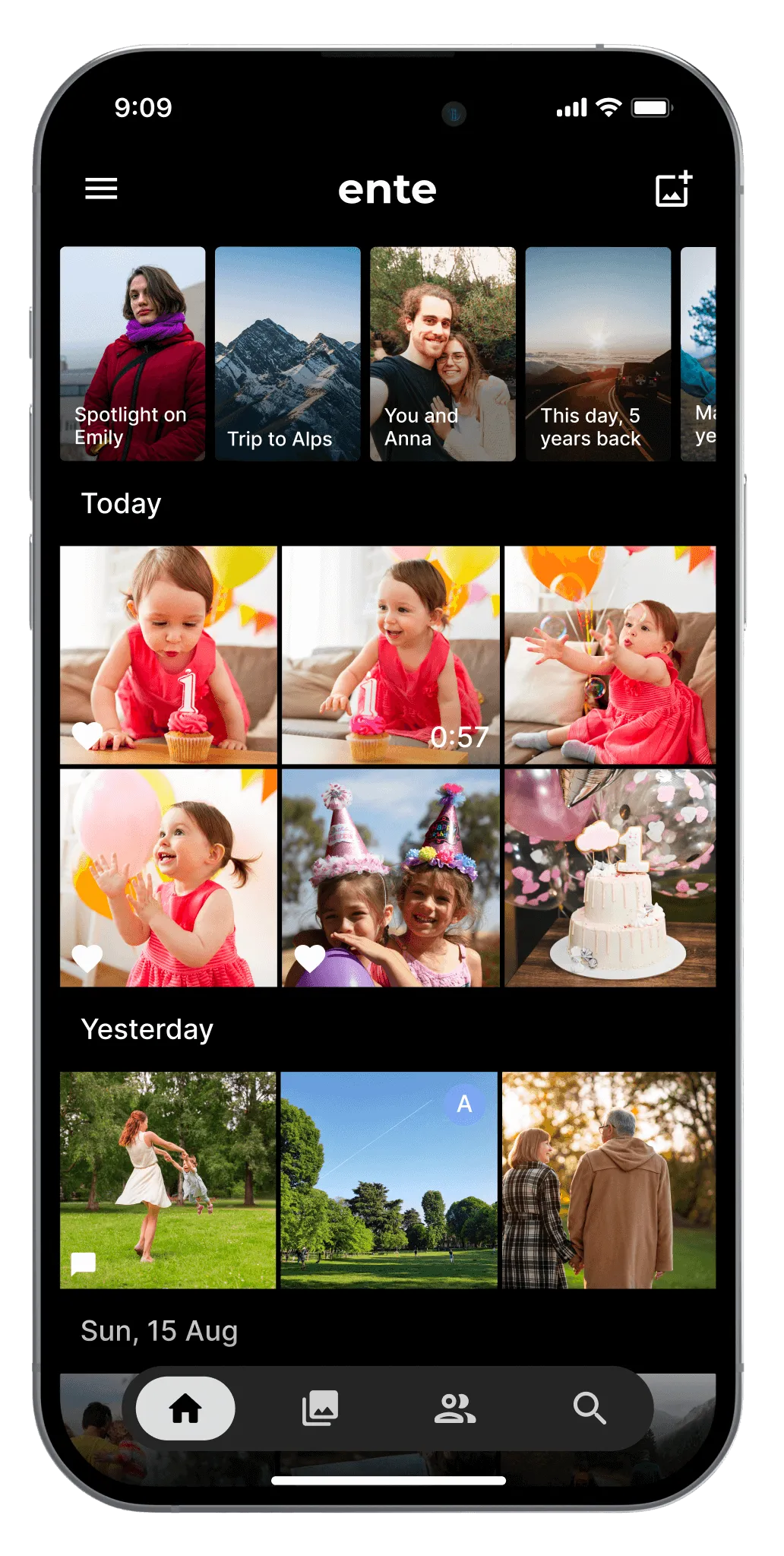
On my mobile phone, the Ente Photos app feels on par with mainstream photo apps, but with privacy built in. This is the sweet spot for privacy-focused apps, with Signal being another great example. I could see users opting into Ente without even being aware that the privacy benefits are a key feature, and this is a good thing.
Having pictures organised by date in reverse order works well in combination with thumb scrolling, and older images load quickly. This is satisfying, as I have not always had the same experience with other cloud-based applications. I like that you can add images to your favourites easily, and sharing one or multiple photo's is a breeze. More about that in a moment.
Once you have enabled machine learning on PC, that information is synced with your phone, and you can then do searches like 'table' to find all images containing tables, or select on someone's face to see a group of photo's with that person in them:
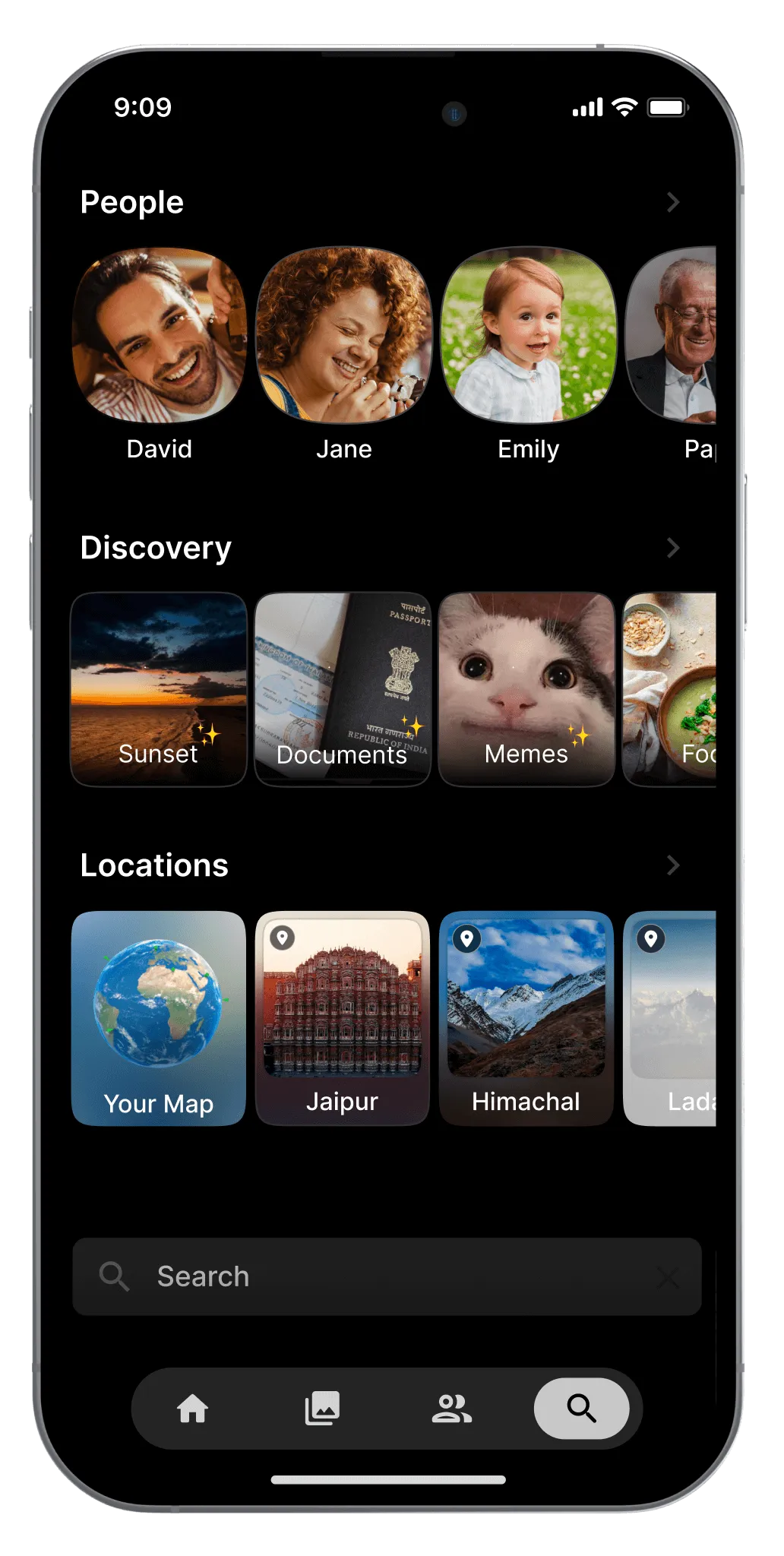
Ente Photos' AI does not yet recognise how someone might age, and creates different profiles for the same individual at different ages.
It is easy to select which local folders you want Ente Photos to sync with, which then allows you to free up space on your device. This is all done intelligently from within the Ente Photos application.
Albums and search feel a more accessible on the app than on desktop, as these are accessed in their own windows with the press of a button, while on desktop your albums appear as a horizontal banner across the top of the interface.
For mobile privacy fans, Ente works well on custom ROMs like GrapheneOS without any type of Google environment. I was even able to install Ente Photos on Droidian, a Linux mobile operating system. The app was labelled there as 'desktop only' but I found it worked well on my phone.
One criticism of Ente Photos on mobile is that I don't fully trust that it is always actively syncing my photo's. I wrote to the help desk about this and they replied: "It’s recommended to open the app once in a while to ensure everything stays in sync." Given the purpose of a cloud tool like this, I feel this should be improved: Ente should always be on and actively syncing without manual intervention from the user.
The top of the home page focuses on fun extra features like 'On this day' and 'January through the years' which I find enjoyable and heart-warming to scroll through.
Sharing and collaborating with Ente Photos
Last night, I shared some old photo's of my kids that appeared in the 'On this day' feature to our Signal family group, which is easy to do and intuitive.
It is also easy to select multiple photo's for sharing. Ente Photos creates an album but, unlike with the desktop version, it does this automatically and unobtrusively, which is a much better sharing experience.
Another great feature is that you can share photo's and albums with non-Ente users, and they do not need to make a free Ente account to view these photo's! This feels like a light and smart way to attract potential new users to the platform.
Additionally, it is also possible to create a collaborative album that non-Ente users can upload their own photographs to. This is very useful after an event like a family Christmas visit. Rather than having to download and manage photo's shared in series of messenger posts, you can share a link to one album everyone can contribute to, whether they have an Ente account or not.
While my children prefer sharing and keeping their photo's within a messenger app like Signal, I much prefer to manage those images in a more organised way. I recently changed phones and Signal transfer did not work, so I lost all my message history, but the photo's are safe.
Finally, recent update allows users with free Ente accounts to share albums with non-Ente viewers, but there is a limit of five devices per album.
Wrapping up
The Ente team comes across as friendly and dynamic; the tone of the emails with updates is enthusiastic, not over-bearing. Vishnu, the CEO of Ente, has appeared in several interviews and has started his own podcast. He is family-oriented and seems practical and down-to-earth when discussing the importance of privacy. (He talks very fast in interviews though!). I'll add some links to those interviews below. I have found him personable and approachable in email communication regarding these reviews, and he seemed open the feedback my kids and I have communicated.
The overall experience of Ente Photos is very good, but not perfect. There are the discrepancies between the desktop and the mobile app experiences I've described above. I once manually scanned and uploaded an old paper family photo album, and found it impossible to get those pages in the right order in the digital version of the album on Ente. Sharing on the desktop version is not as smooth an experience. You cannot 'favourite' images on desktop with one click, and for some reason I always have trouble finding the photo's that I have favourited, which is opposite to what it should be.
I was careful to get assurances from Vishnu about the built-in privacy of the AI tool before I activated it. It is a fun additional feature that makes searching easier.
The Ente website, logos and colours are inviting, and their support documentation is excellent. As mentioned, the help desk is responsive and friendly, and also honest about current limitations.
In summary, while the desktop experience (on Linux at least) has some room for improvement, the Ente Photos app on mobile is entirely competitive with privacy-invasive alternatives. The development and support teams are dynamic and positive, and Ente seems to be constantly gaining momentum in its improvements.
If you're looking for a cloud storage alternative that just focuses on photo's and videos and does that really well, I definitely recommend giving Ente Photos a shot!
Documentation
Ente's friends network for discounts
Ente - Google Photos with Privacy! (ft. CEO Vishnu Mohandas) Techlore, 30 October 2024
Vishnu's Podcast ft. Mo Bitar - Founder of Standard Notes [Part 1]
Techlore on Privacy, Surveillance and Optimism | Vishnu’s Podcast
Related posts
My Teenager's Review of Ente's Privacy Photo App
Using Droidian on a Google Pixel 3AXL Phone
-----Discuss on Mastodon-----
Subscribe to my blog via email or RSS feed.
Find me on Mastodon.
Back to Blog
I see that pCloud now advertises its own photo-specific application, but I have not had a chance to try that out myself.↩